
Built for Le Mans Ultimate
Plan the race.
Run it from the pit wall.
StintLab is endurance race strategy and a live race engineer for Le Mans Ultimate. Plan every stint, stop and tire set with your team, then let the companion app call the stops from your car’s real numbers.
- Free while we grow
- Nothing to install to plan
- Fuel, energy, tires and rain
StintLab is free while we grow. Paid plans will come later, and everyone who joins before then gets a big early-supporter discount as a thank-you.
Racing with a team? Sign in with Discord to keep rooms, saved data and teams on any PC.
Trusted by
How it works
Three steps from sign-up to the green flag
-
In your browser · minutes
Plan the race
Make a room, pick the track and car, and setup builds the stints, stops and tire sets. Send the link to your crew.
Try it below -
In practice · a few laps
Measure your car
Run the companion app with LMU. It measures lap time, fuel, energy and tire wear, and the plan uses your real numbers.
About the companion -
Race day · live
Race with an engineer
The Race tab calls the stops from the car’s live data, and the spoken engineer tells the driver what is coming.
See race day
Try it now
Your race in ten seconds
Set the race length, your lap time and fuel use. This quick preview counts fuel only; the planner adds virtual energy, tires, weather and your drivers’ hours.
About a minute lost per stop. Stints are spread evenly. Plan this race for real carries these numbers into a new room.
For the whole crew
Made for every seat on the team
Keep your eyes on the road
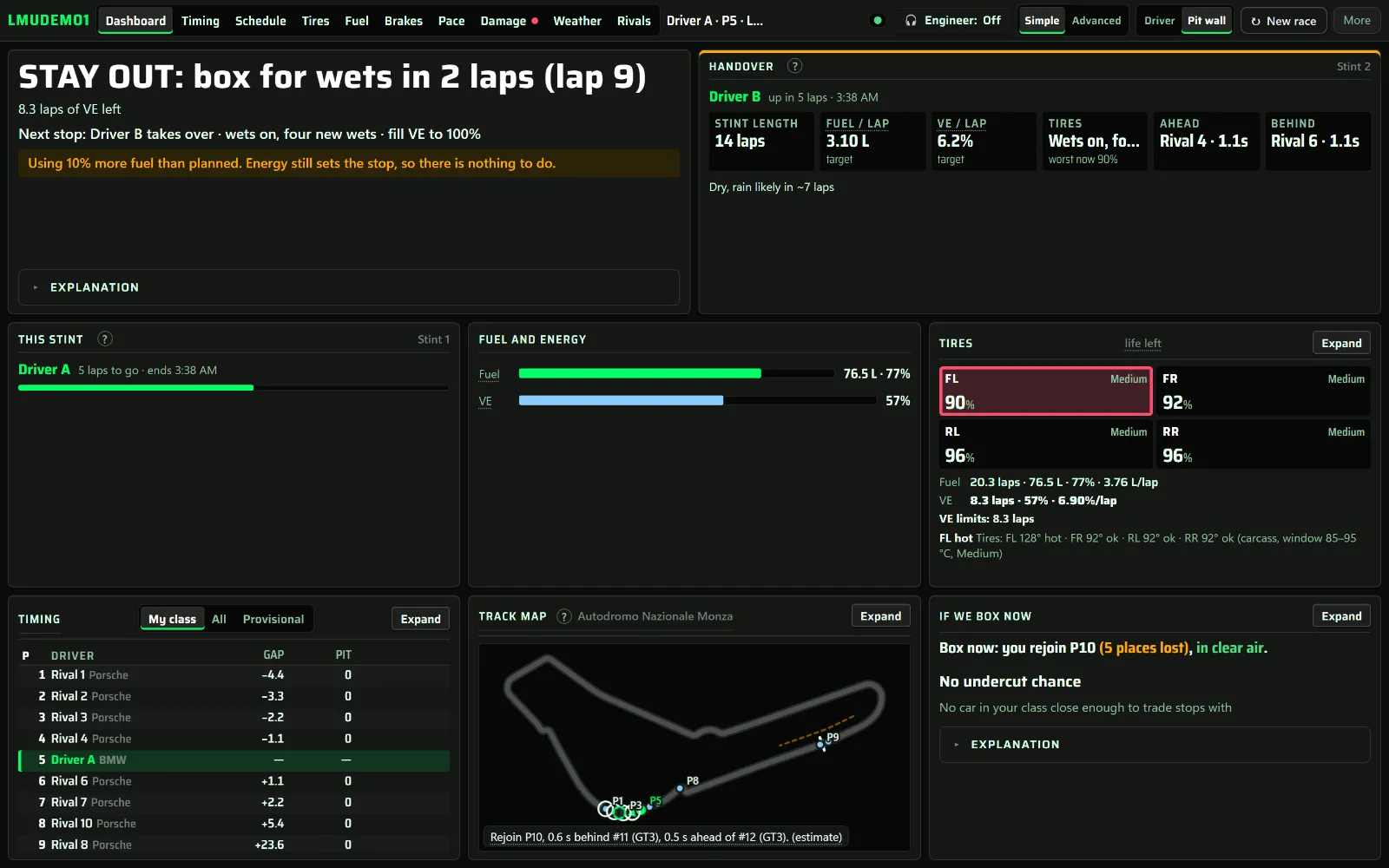
The Race tab turns the plan into calls: box, stay out or undercut, worked out from your fuel and energy against the cars around you.
- A spoken race engineer – pit calls, the stop ahead, gaps and the last laps, as chatty as you like
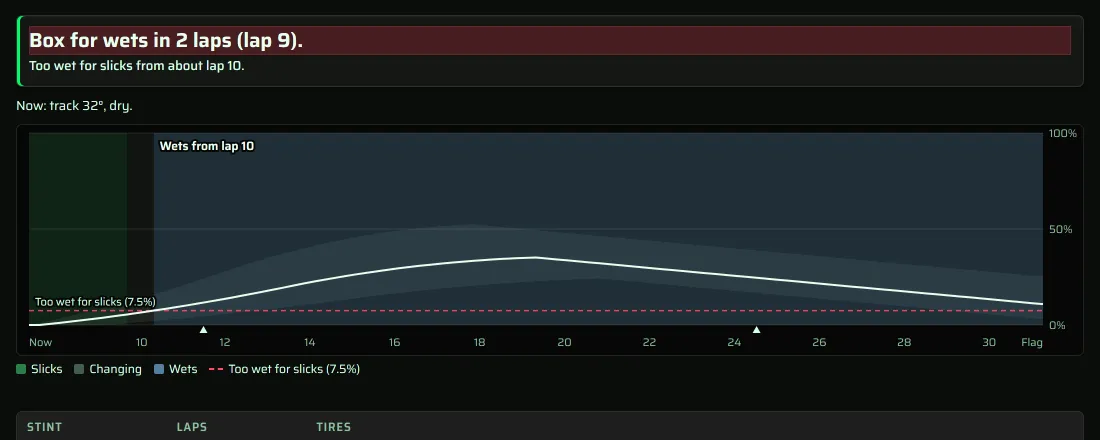
- Box calls – including when to switch to wets, from the game’s forecast
- A flashing pit call – in the in-game overlays, next to fuel, tires and the relative
- Auto pit – fills the game’s pit menu for the next stop from the plan
From an empty room to a race plan in about 8 clicks
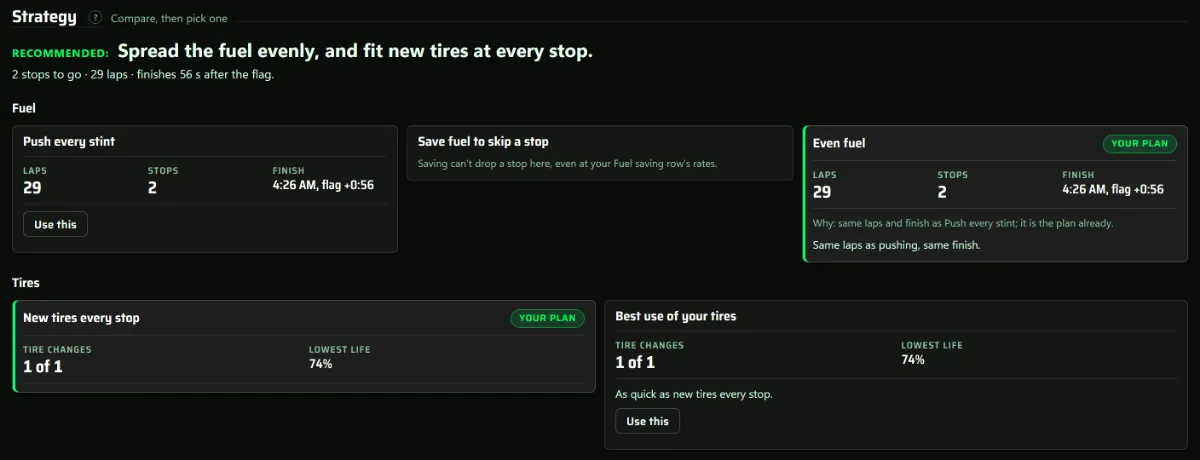
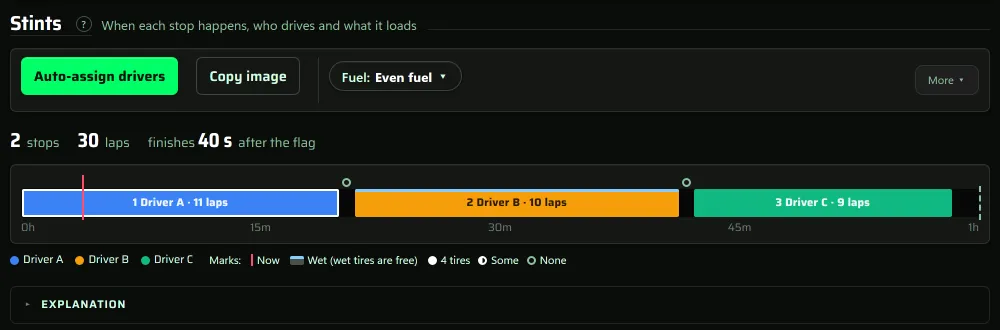
Pick the track and car, or start from an official LMU race. Setup offers your saved data first, preselects the recommended fuel and tire strategies and assigns your drivers when you finish.
- Fuel and virtual energy – whichever runs out first sets each stint
- Strategies side by side – push every stint, even fuel, or save fuel to skip a stop
- Tires that fit your allocation – double-stints where they pay, and wets never count
- What if… – slower laps, more fuel use or rain at half distance, before you change anything
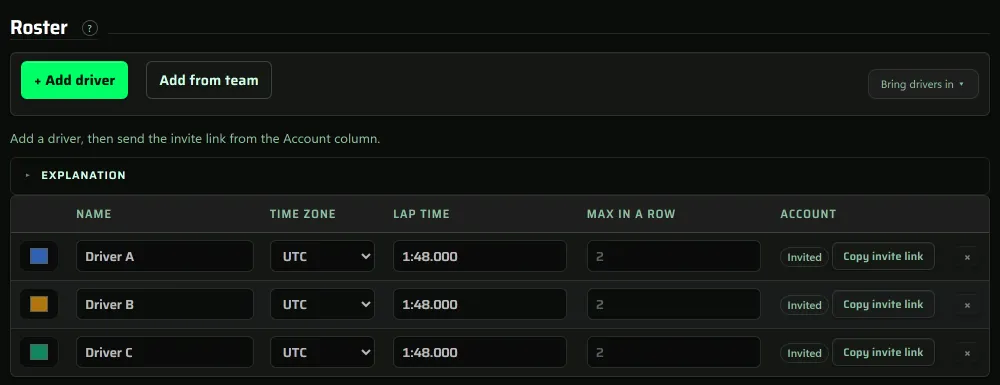
One room for the whole crew
A room is one race, and everyone in it sees the same plan, live. Send an invite link, and each driver marks the hours they can drive in their own time zone.
- Availability – one grid for the whole crew; auto-assign fills the stints from it
- Teams – the same crew every race, with everyone’s numbers side by side
- Driver swaps – drivers are recognized in the car and the next one gets a heads-up
- Discord – a card in your channel every time a stint closes
Follow the race from anywhere
- A spectator link – read only, no account needed
- Dashboard presets – for the driver, engineer, strategist and spectators
- On a phone – a card view: who is on track, when they box, and the stints after that
- Stints as they happen – the timeline re-times off what really happened
The companion app
Your car’s real numbers, live
A small Windows app that reads LMU’s telemetry and sends it to your room. Drive a few laps in practice and it measures lap time, fuel, energy and tire wear, and saves them for that car and track.
- Stints close themselves – the plan re-times off what really happened.
- In-game overlays – relative, standings, fuel, tires, radar, a flashing pit call and more.
- Auto pit – fills the game’s pit menu for the next stop from the plan.
- One-click sign-in – no codes to copy, and it finds your race room for you.
Always improving
Built with the drivers who use it
StintLab ships updates almost every week, most of them asked for in the Discord.
LMU races & ratings
Know what’s on, and how it went
- Schedule The daily, weekly and special races in your time zone, with reminders and a plan for any start.
- Official results Best laps with sectors, race stats, car strength and BoP from official LMU races.
- Leaderboards Lap times, LMU Ratings (official DR/SR) and StintLab Ratings, to see where you stand.
Questions
Before you start
Is it free?
Yes, for now. StintLab is free while we grow: the planner, the Race tab and the companion app. Paid plans will come later, and everyone who joins before then gets a big early-supporter discount.
Do I need an account?
No. Make a room and start planning straight away; anyone with the room link can open it. Sign in with Discord when you want your rooms, saved data and teams kept on any PC.
Do I need the companion app?
It’s optional: you can type every number by hand. But the companion measures your real lap time, fuel, energy and tire wear, and it is what makes the Race tab live. It runs on Windows next to LMU. Download it.
Can my teammates and friends watch?
Yes. Send the invite link to your drivers, and the read-only spectator link to anyone who only wants to watch. On a phone the Race tab becomes a simple card view: who is on track, when they box, and the stints after that.
Does it handle virtual energy, tires and rain?
Yes. Fuel and virtual energy both count, whichever runs out first sets the stint. Tire plans fit your allocation (wets never count), and Weather says when to box for wets from the game’s forecast.
Where do I get help?
The guide covers every screen, and the community Discord is there for questions and ideas.
Your next race
Lights out in about 8 clicks
Pick how you want to start. Sign in whenever you like; saved data from this browser moves to your account.